OpenAI-compatible endpoints are bring-your-own-key only. Your provider bills inference to your account, and Pullfrog never proxies this traffic.
Setup
1
Pick Custom (OAI) on the Provider card
In the Pullfrog console, pick the Custom (OAI) tile on the Provider card.
2
Store the five values
Click Set up on the tile and fill in the five values from the table below. Pullfrog injects them into every run, so 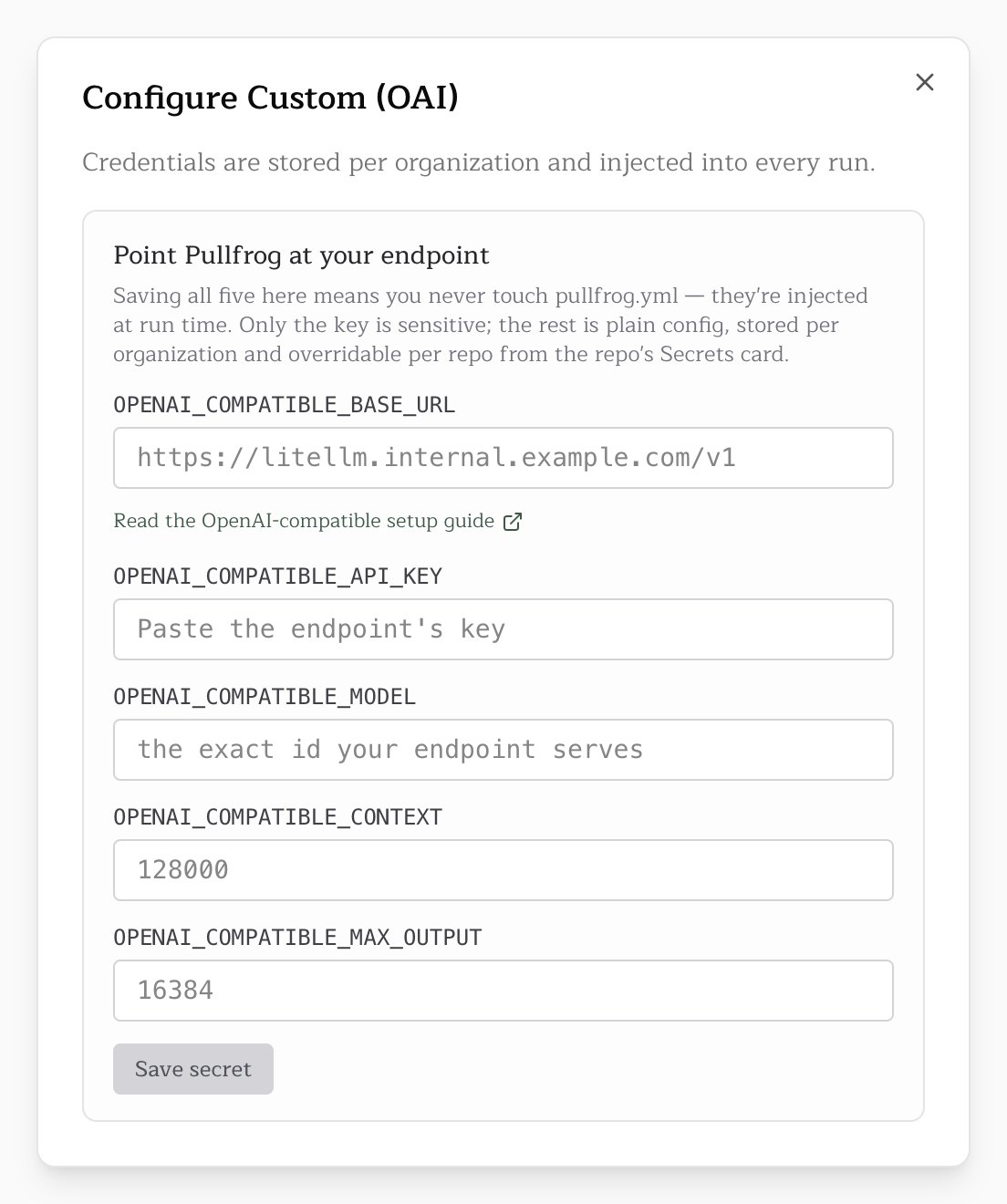
pullfrog.yml needs no changes. Values stored for the organization can be overridden per repository.OPENAI_COMPATIBLE_API_KEY in a GitHub Actions secret and the rest in the env: block of .github/workflows/pullfrog.yml:Variables
All five are required, and a run without them fails before the agent starts. The two limits must be positive numbers, so
128k is rejected. A value set in the workflow wins over a stored one.
Put the key only in OPENAI_COMPATIBLE_API_KEY, never inside the base URL. A base URL set in the workflow is not masked in logs.
On an account that pays through Pullfrog Router, store the values in the Pullfrog console. Pullfrog decides how to fund a run before the runner starts, when GitHub Actions secrets are not visible to it, so a run whose values exist only there falls back to the Router’s default model.
Token limits
Your endpoint owns the model catalog, so Pullfrog cannot look up the model’s limits and needs you to declare them. Undeclared limits would break two things:- Completions are capped at 32000 tokens, and a model with a smaller cap rejects every request. GPT-4o and GPT-4o mini stop at 16384, and many open models at 4096 or 8192.
- Auto-compaction turns off. Compaction keys off the context limit, so a long session grows until the endpoint refuses it.
OPENAI_COMPATIBLE_CONTEXT to the model’s real window. A low value compacts earlier than needed; a high value delays compaction until the endpoint refuses the request.
Several endpoints
Give an endpoint a name to keep more than one. Each named endpoint holds its own five values and appears in the model menu under Custom, so every repository can pick one, and switching between them never means entering a key again.1
Name the endpoint
In the Configure Custom (OAI) dialog, type a name under Add a named endpoint and click Add. Names use lowercase letters, digits and single hyphens, such as
vllm-a, up to 32 characters.2
Store its five values
Fill in the endpoint’s base URL, key, model ID and token limits, and save.
3
Pick it
Choose it in a repository’s model menu, or name it for a single run with
@pullfrog --model=openai-compatible/vllm-a.OPENAI_COMPATIBLE_. To keep vllm-a in the workflow instead:
OPENAI_COMPATIBLE_* names and the OpenAI-compatible menu entry, so existing setups need no change. Named endpoints need Pullfrog 0.1.105 or later; an older runner reads openai-compatible/vllm-a as the model ID vllm-a on the unnamed endpoint.
Model IDs
The model menu’s OpenAI-compatible entry runs the unnamed endpoint;OPENAI_COMPATIBLE_MODEL names the actual model, in your gateway’s own format:
LiteLLM
A LiteLLM proxy needs no special configuration. Point the base URL at the proxy’s/v1 path and use a virtual key:
Routing
Pullfrog runs the model on OpenCode, through an@ai-sdk/openai-compatible provider pointed at OPENAI_COMPATIBLE_BASE_URL. Requests go to <base URL>/chat/completions with your key as the bearer token.