Where flags are read
Pullfrog assembles each run’s instructions from these levels, most general first:- Org standing instructions — every repository in the organization
- Repo standing instructions — every run in the repository
- Mentions instructions — runs started by an
@pullfrogmention - The per-run request — your
@pullfrogprompt, or the triggering automation’s instructions when you did not tag Pullfrog
@pullfrog, your prompt is the request and the automation’s instructions do not apply.
Flags resolve when Pullfrog starts a run from a GitHub event. A run started with a raw prompt through the headless action skips this resolution; configure it with the action’s inputs instead.
Custom flags (aliases)
A custom flag is a text alias: define--refactor once, and every occurrence expands in place to its replacement text. Use one for any snippet you repeat, such as a refactoring checklist or a review rubric.
Define custom flags at the org level, where every repository can use them, or at the repo level, where a flag shadows an org flag with the same name. A flag name starts with a letter and contains letters, digits, underscores, and hyphens. Names are case-sensitive, so --refactor and --Refactor are different flags.
Aliases expand before built-in flags resolve, so an alias can contain built-in flags:
@pullfrog fix the flaky test --ship runs on Claude Opus with no timeout. Expansion is a single pass: an alias inside an alias’s text is not expanded again.
Creating a flag
1
Open the Flags card
In a repository’s console, open Agent → Flags. For an organization-wide flag, open the organization console and expand Advanced.
2
Add the flag
Click Add flag, enter the Flag name without the dashes (for example
refactor), and enter the Replacement text.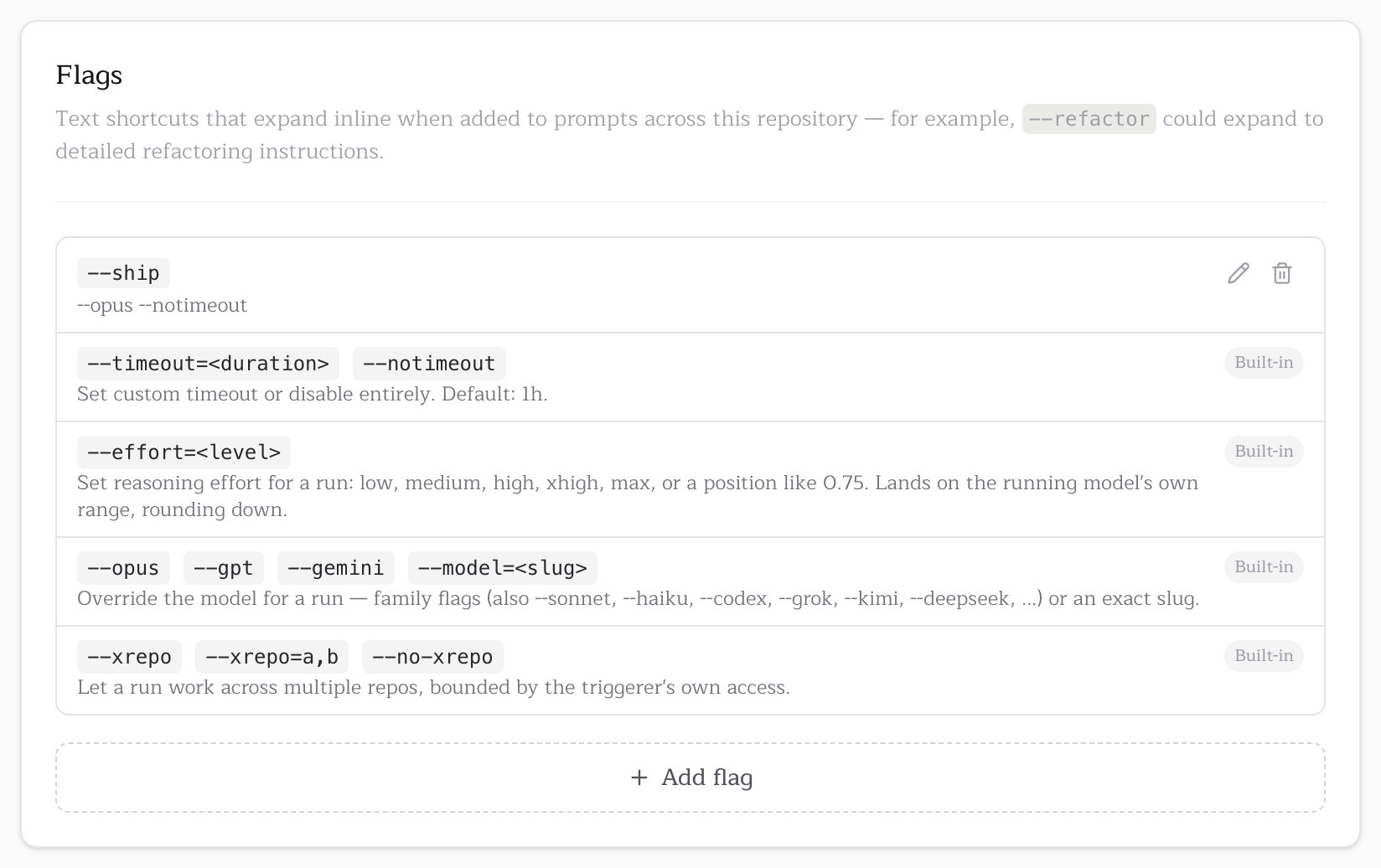
Precedence
Built-in flags resolve last-occurrence-wins across all levels. Reading org, then repo, then the per-run request, the last value of a flag wins, so a more specific level overrides a more general one:Built-in flags
Model
A model flag overrides the model for one run. Family flags resolve to the latest version of that model, on the repository’s current provider when that provider carries it:
A model flag in your own
@pullfrog prompt is an explicit request. If the run cannot serve that model, because no provider key is configured, the OSS subsidy does not fund it, or Pullfrog Router cannot serve it, the run fails before the agent starts with an error that names the fix. A model flag in org, repo, or automation instructions is a standing default, and the run treats it like the repository’s own model setting.
A --model= slug that Pullfrog does not recognize is left in the prompt as plain text.
Timeout
The default is 1 hour. A
timeout input on the workflow step takes precedence over these flags.
Debug
Use it when a run fails with nothing useful in the log. The log then records Pullfrog’s debug output and each request to your model provider. The flag changes only what the run logs, never what the agent may do, and applies only to the run you put it on.
The workflow input does the same for every run of that workflow:
Debug logs are verbose and visible to anyone who can read your repository’s Actions logs. Turn debugging on for the run you are diagnosing, then off again.
Effort
Higher effort reasons longer and costs more; lower effort finishes faster. Models name and count their levels differently, so
--effort sets a position on the running model’s own range: low is its lowest level and max its highest. A level between two of the model’s levels rounds down. The repository’s effort setting is the default.
Like every built-in flag, --effort=medium in repo instructions is a standing default that a per-run --effort=max overrides. An alias can wrap it:
Cross-repo
By default a run works only in the repository that triggered it. The--xrepo flag lets one run read, and open PRs in, a bounded set of other repositories in the same organization.
The triggering user’s own GitHub permissions bound every cross-repo run, so a run never touches a repository that person could not already touch:
- A repository the user can only read is reference-only: the run can clone and inspect it but not open PRs.
- A repository the user can write to accepts branches and pull requests.
- A run started by a bot rather than a person gets no cross-repo access.
list_repos to see what is in scope and checkout_repo to clone another repository, then passes repo: "<name>" to the git and pull-request tools to work in it.
Two org-level settings steer cross-repo work: a Cross-repo brief that you write to describe how your repositories relate, and Cross-repo learnings that Pullfrog maintains over time. See Cross-repo learnings.