> ## Documentation Index
> Fetch the complete documentation index at: https://docs.pullfrog.com/llms.txt
> Use this file to discover all available pages before exploring further.
# PR reviews
Pullfrog can automatically review pull requests, re-review when new commits land, and — uniquely — go back and **implement** the changes it (or a human) requested. All of this is configured in the **Reviews** section of the console.
## Auto-review new PRs
When enabled, Pullfrog reviews every new pull request (or every PR marked ready for review) using your selected model and review instructions. The initial review body opens with a PR summary so reviewers see the intent of the change at a glance, alongside any inline feedback.
For smaller fixes, Pullfrog uses **Suggest changes** so you can apply updates directly from the review thread.
### Options
* **Include draft PRs** — review PRs even before they're marked ready
* **Allow Pullfrog to approve PRs** — let Pullfrog submit approving reviews, not just comments and change requests
* **Include external contributor PRs** (public repos) — review PRs from non-collaborators
You can also request a one-off review on any PR by mentioning `@pullfrog` in a comment.
## Re-review on new commits
When someone pushes new commits to a PR that Pullfrog already reviewed, it automatically performs an incremental re-review focused on just the new changes. The re-review body summarizes what changed since the previous review, so reviewers get a running record of the PR's evolution alongside any new feedback.
If a re-review is already running when more commits arrive, the running review picks up the latest commits automatically — no duplicate dispatches.
## Address reviews
A Pullfrog review isn't just a list of suggestions — Pullfrog can turn around and **implement** the feedback in a follow-up commit. This is what makes the review loop actually fast: feedback in, code out, no manual re-trigger.
There are three ways to invoke this:
### Auto-address reviews on Pullfrog PRs
When a human submits a review on a PR that Pullfrog opened, Pullfrog automatically picks up the comments, applies the requested changes, and pushes. Configure the toggle under **Address reviews** in the console.
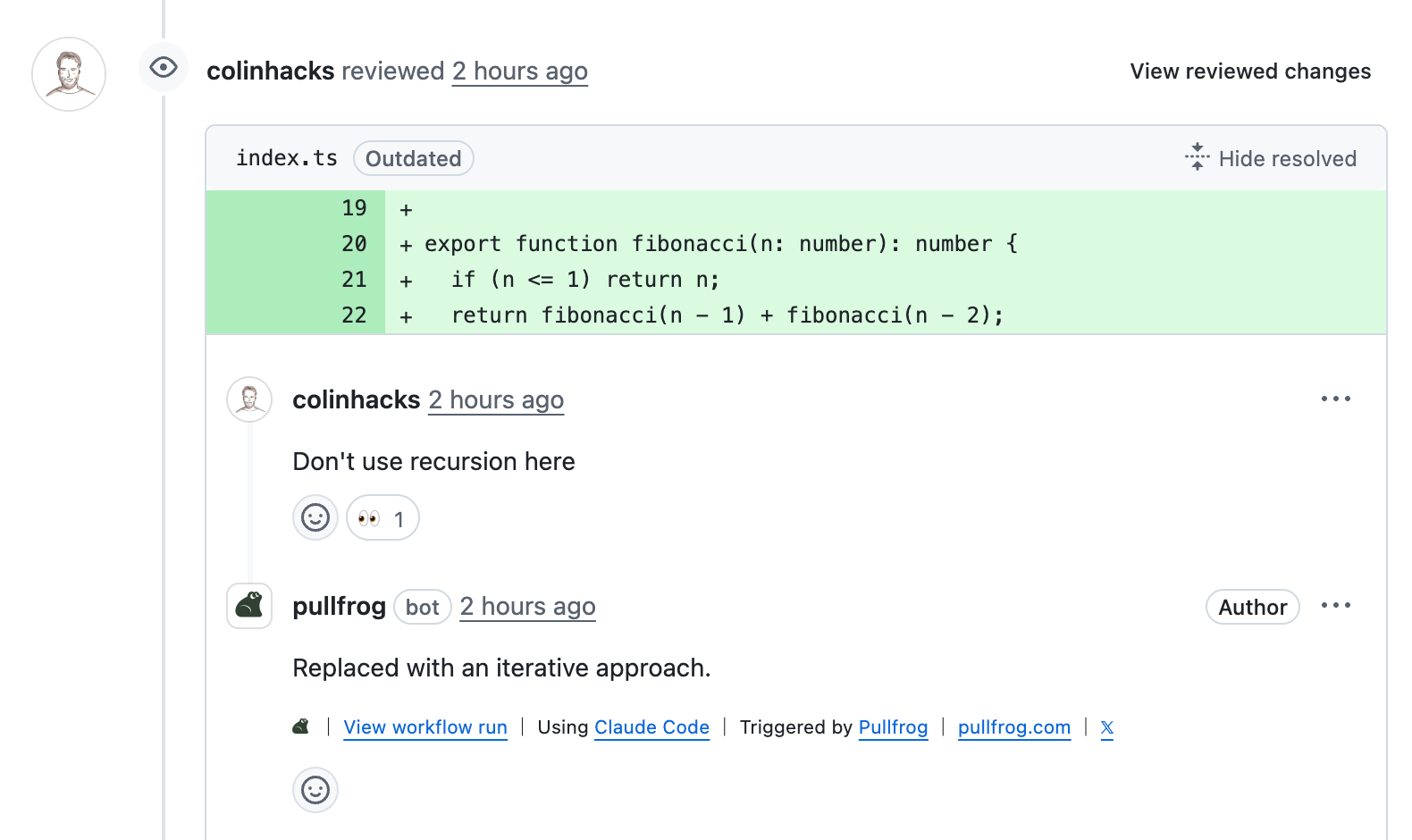 ### Comment to request a fix
On any PR (Pullfrog's or yours), comment with `@pullfrog` plus instructions to ask for a specific change.
### Comment to request a fix
On any PR (Pullfrog's or yours), comment with `@pullfrog` plus instructions to ask for a specific change.
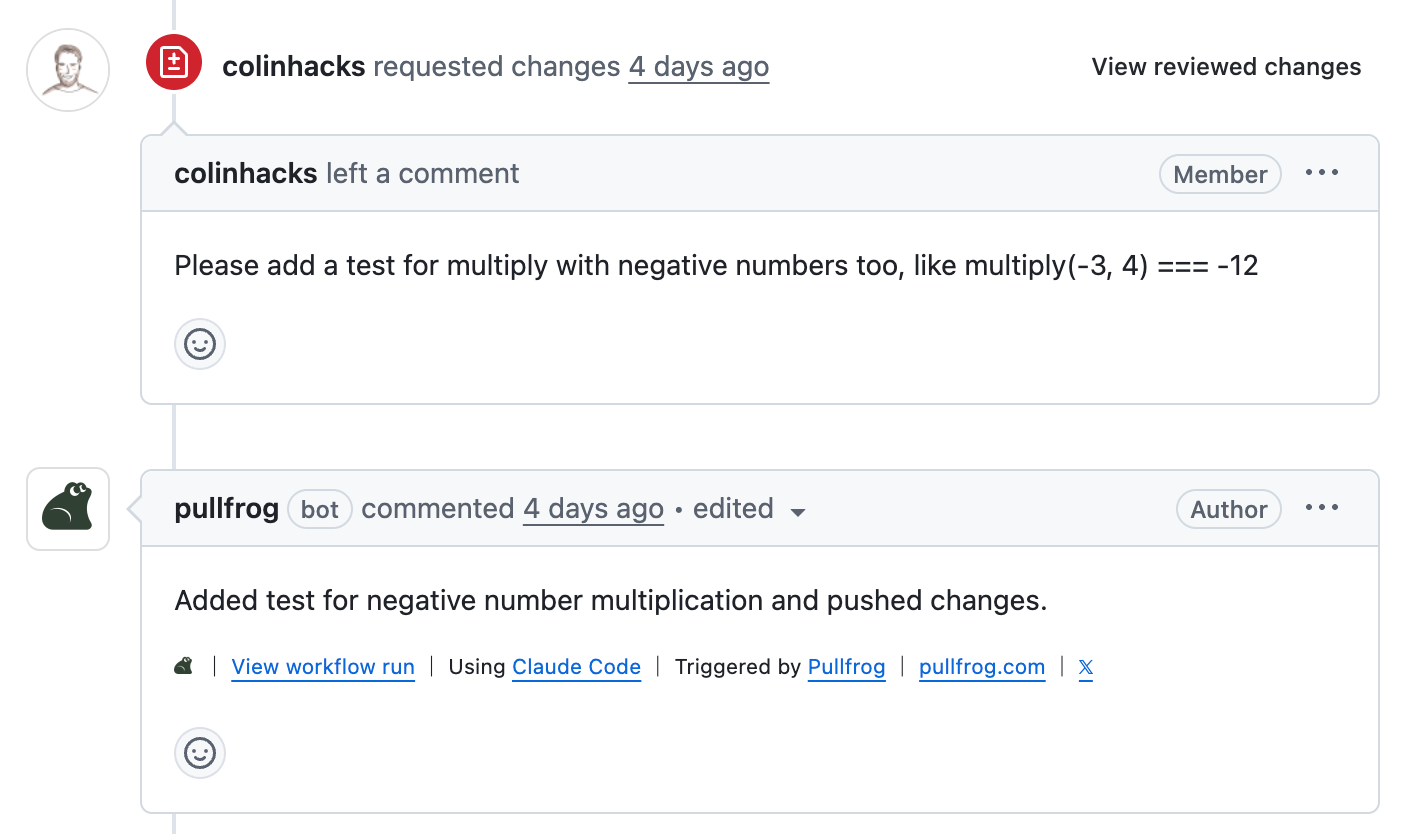 For line-level feedback, comment in the review thread itself so Pullfrog anchors the change to the exact lines.
### Fix all, or fix the 👍s
After Pullfrog (or anyone) leaves a review with multiple comments, you have two batch options on the review summary comment:
* **Fix all** — Pullfrog addresses every comment in the review in one pass.
* **Fix 👍s** — react with a 👍 on each comment you agree with, then click **Fix 👍s**. Pullfrog applies only those fixes and resolves the corresponding threads.
For line-level feedback, comment in the review thread itself so Pullfrog anchors the change to the exact lines.
### Fix all, or fix the 👍s
After Pullfrog (or anyone) leaves a review with multiple comments, you have two batch options on the review summary comment:
* **Fix all** — Pullfrog addresses every comment in the review in one pass.
* **Fix 👍s** — react with a 👍 on each comment you agree with, then click **Fix 👍s**. Pullfrog applies only those fixes and resolves the corresponding threads.
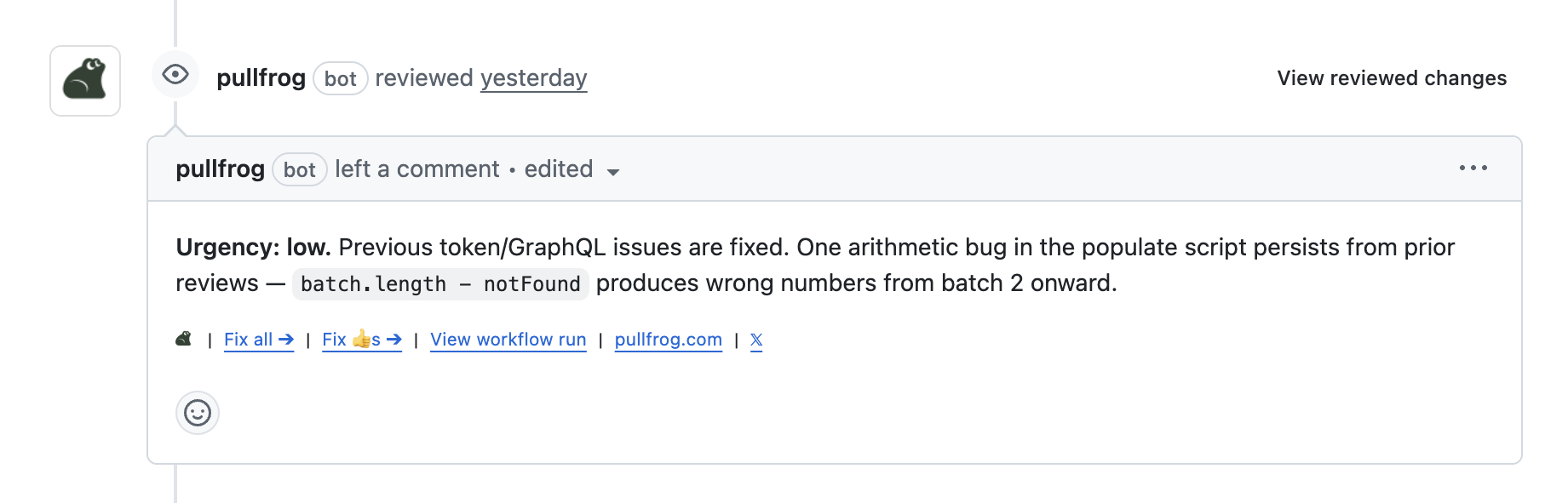 This is especially useful on long reviews: triage with reactions, hit one button, get a focused commit back.
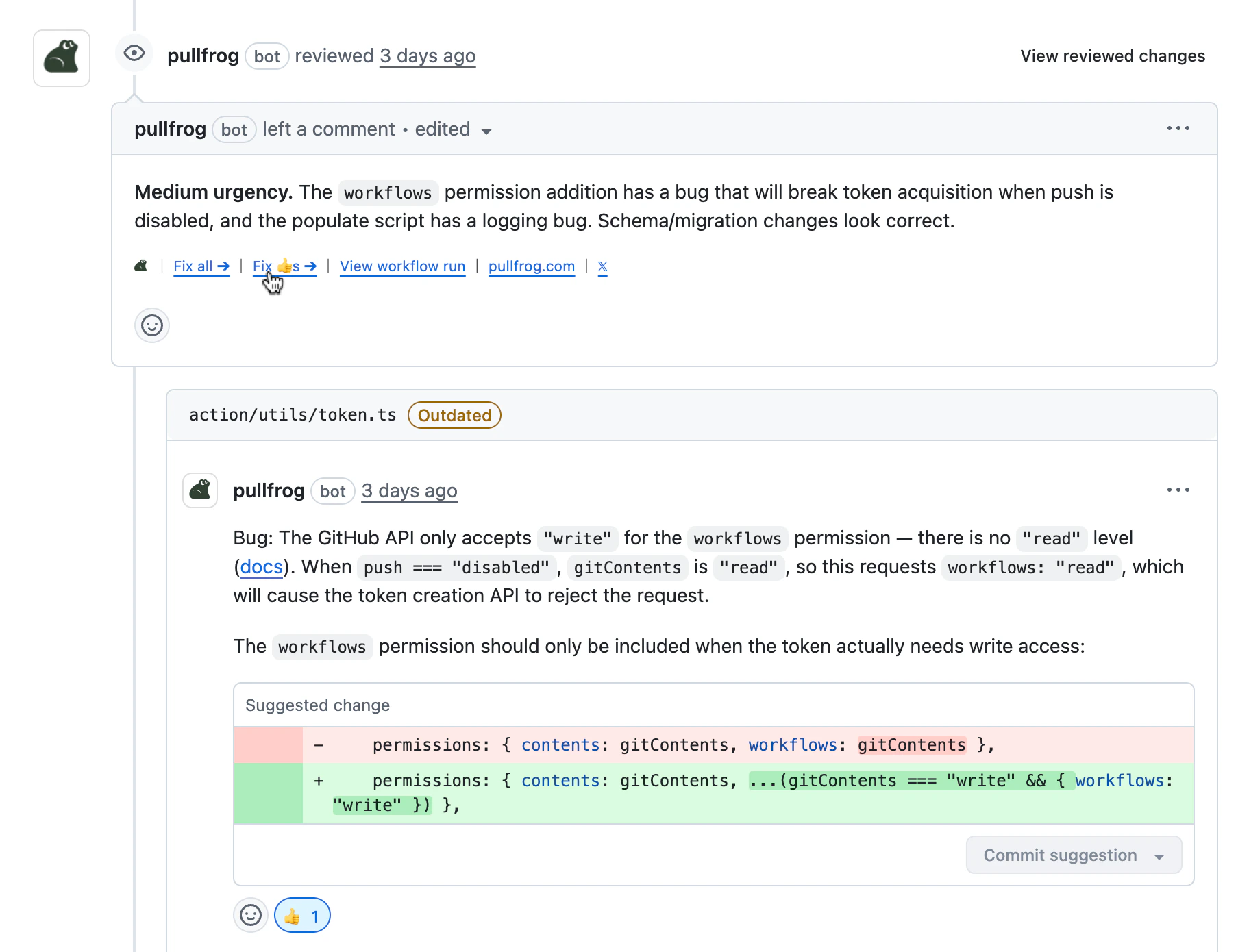 When a **Fix all** (or **Fix 👍s**) run finishes and every review thread Pullfrog raised on the PR is resolved, Pullfrog approves the PR with a summary of what it changed. This only happens with **Allow Pullfrog to approve PRs** enabled, and the approval is contingent on Pullfrog's own findings actually being addressed — if any Pullfrog thread is still open (e.g. a **Fix 👍s** run that only resolved a subset), Pullfrog leaves the PR unapproved.
External PRs work too. Pullfrog can update fork-based PRs and push changes back to the fork branch, as long as maintainers are allowed to edit the PR.
## Auto-merge approved PRs
With auto-merge enabled, approving a PR is the last thing Pullfrog does to it. Instead of merging the PR itself, Pullfrog turns on GitHub's built-in auto-merge, and GitHub merges the PR once your required status checks pass and any required reviews are in. It behaves like a teammate who reviews your PR, approves it, and clicks "auto-merge."
* **GitHub does the merge, not Pullfrog.** Pullfrog approves and enables native auto-merge. GitHub waits for slow CI and merges the moment your branch-protection rules are satisfied.
* **A human "request changes" always wins.** Branch protection blocks the merge until the requested change is resolved. Pullfrog cannot merge over it and cannot edit your rules.
* **Contributor and fork PRs are included.** GitHub enforces the same required checks for everyone, and those checks cannot be faked by a fork, so a contributor cannot get code onto your default branch without passing CI.
* **Branch protection is required.** Set up branch protection with a required status check so GitHub holds every merge until CI passes. Without branch protection, Pullfrog approves the PR but will not merge it — auto-merge is a no-op until you configure it. Add a required human reviewer if you want a person to sign off on every merge.
* **Enable "Allow auto-merge" on the repo.** GitHub's `Allow auto-merge` setting (Settings → General → Pull Requests) is off by default and is required for Pullfrog to hand a PR to native auto-merge. Without it, an approved PR can't be armed and won't merge.
With branch protection in place, Pullfrog can approve and hand off but can never merge past a required check, a required review, or a human's requested changes. Without branch protection, Pullfrog approves but refuses to merge — it will not merge a PR that no required check has gated.
## Required status checks (branch protection)
If you run Pullfrog through a workflow ([headless action](/headless-action)), it can post two commit-status checks on each PR run so you can require them in your branch protection rules. Both are **opt-in** — set `status_checks: enabled` on the Pullfrog step:
```yaml theme={null}
- uses: pullfrog/action@v0
with:
prompt: ${{ ... }}
status_checks: enabled
```
| Check | Meaning |
| ------------------- | -------------------------------------------------------------------------------------------------------------------------------------------------------------------------------------------------------------------------------------------------------------------------------------------------------------------------------- |
| `pullfrog` | The Pullfrog run finished. Success when the run completes, failure on error or timeout — independent of the review verdict. Require this so branch protection stops hanging at "waiting for status" while a run is in flight. |
| `pullfrog-approval` | Whether Pullfrog **would approve** the PR. Success when Pullfrog has no outstanding feedback; failure when it requested changes or any prior Pullfrog finding is still unresolved. This is separate from **Allow Pullfrog to approve PRs** — you can require the check without letting Pullfrog submit binding GitHub approvals. |
Both checks attach to the commit Pullfrog ran against: `pullfrog` to the checked-out head, and `pullfrog-approval` to the exact commit Pullfrog reviewed. `pullfrog-approval` is posted only on runs that produce a review verdict — so when someone pushes new commits, the new head has no approval check until Pullfrog re-reviews, which keeps a required `pullfrog-approval` blocking until the re-review lands. A run that errors or is cancelled leaves the required check absent (not stuck), which blocks the merge until the next run reports.
Pullfrog never approves a PR while any prior Pullfrog review thread is still unresolved — even if the latest commit introduces no new issues. The approval verdict is a function of every open Pullfrog finding on the PR, not just the most recent diff.
## Review instructions
Review instructions guide what Pullfrog focuses on during reviews — they apply to auto-review, re-review, and manual `@pullfrog` review requests. Edit them in the **Modes** card on the repo console:
When a **Fix all** (or **Fix 👍s**) run finishes and every review thread Pullfrog raised on the PR is resolved, Pullfrog approves the PR with a summary of what it changed. This only happens with **Allow Pullfrog to approve PRs** enabled, and the approval is contingent on Pullfrog's own findings actually being addressed — if any Pullfrog thread is still open (e.g. a **Fix 👍s** run that only resolved a subset), Pullfrog leaves the PR unapproved.
External PRs work too. Pullfrog can update fork-based PRs and push changes back to the fork branch, as long as maintainers are allowed to edit the PR.
## Auto-merge approved PRs
With auto-merge enabled, approving a PR is the last thing Pullfrog does to it. Instead of merging the PR itself, Pullfrog turns on GitHub's built-in auto-merge, and GitHub merges the PR once your required status checks pass and any required reviews are in. It behaves like a teammate who reviews your PR, approves it, and clicks "auto-merge."
* **GitHub does the merge, not Pullfrog.** Pullfrog approves and enables native auto-merge. GitHub waits for slow CI and merges the moment your branch-protection rules are satisfied.
* **A human "request changes" always wins.** Branch protection blocks the merge until the requested change is resolved. Pullfrog cannot merge over it and cannot edit your rules.
* **Contributor and fork PRs are included.** GitHub enforces the same required checks for everyone, and those checks cannot be faked by a fork, so a contributor cannot get code onto your default branch without passing CI.
* **Branch protection is required.** Set up branch protection with a required status check so GitHub holds every merge until CI passes. Without branch protection, Pullfrog approves the PR but will not merge it — auto-merge is a no-op until you configure it. Add a required human reviewer if you want a person to sign off on every merge.
* **Enable "Allow auto-merge" on the repo.** GitHub's `Allow auto-merge` setting (Settings → General → Pull Requests) is off by default and is required for Pullfrog to hand a PR to native auto-merge. Without it, an approved PR can't be armed and won't merge.
With branch protection in place, Pullfrog can approve and hand off but can never merge past a required check, a required review, or a human's requested changes. Without branch protection, Pullfrog approves but refuses to merge — it will not merge a PR that no required check has gated.
## Required status checks (branch protection)
If you run Pullfrog through a workflow ([headless action](/headless-action)), it can post two commit-status checks on each PR run so you can require them in your branch protection rules. Both are **opt-in** — set `status_checks: enabled` on the Pullfrog step:
```yaml theme={null}
- uses: pullfrog/action@v0
with:
prompt: ${{ ... }}
status_checks: enabled
```
| Check | Meaning |
| ------------------- | -------------------------------------------------------------------------------------------------------------------------------------------------------------------------------------------------------------------------------------------------------------------------------------------------------------------------------- |
| `pullfrog` | The Pullfrog run finished. Success when the run completes, failure on error or timeout — independent of the review verdict. Require this so branch protection stops hanging at "waiting for status" while a run is in flight. |
| `pullfrog-approval` | Whether Pullfrog **would approve** the PR. Success when Pullfrog has no outstanding feedback; failure when it requested changes or any prior Pullfrog finding is still unresolved. This is separate from **Allow Pullfrog to approve PRs** — you can require the check without letting Pullfrog submit binding GitHub approvals. |
Both checks attach to the commit Pullfrog ran against: `pullfrog` to the checked-out head, and `pullfrog-approval` to the exact commit Pullfrog reviewed. `pullfrog-approval` is posted only on runs that produce a review verdict — so when someone pushes new commits, the new head has no approval check until Pullfrog re-reviews, which keeps a required `pullfrog-approval` blocking until the re-review lands. A run that errors or is cancelled leaves the required check absent (not stuck), which blocks the merge until the next run reports.
Pullfrog never approves a PR while any prior Pullfrog review thread is still unresolved — even if the latest commit introduces no new issues. The approval verdict is a function of every open Pullfrog finding on the PR, not just the most recent diff.
## Review instructions
Review instructions guide what Pullfrog focuses on during reviews — they apply to auto-review, re-review, and manual `@pullfrog` review requests. Edit them in the **Modes** card on the repo console:
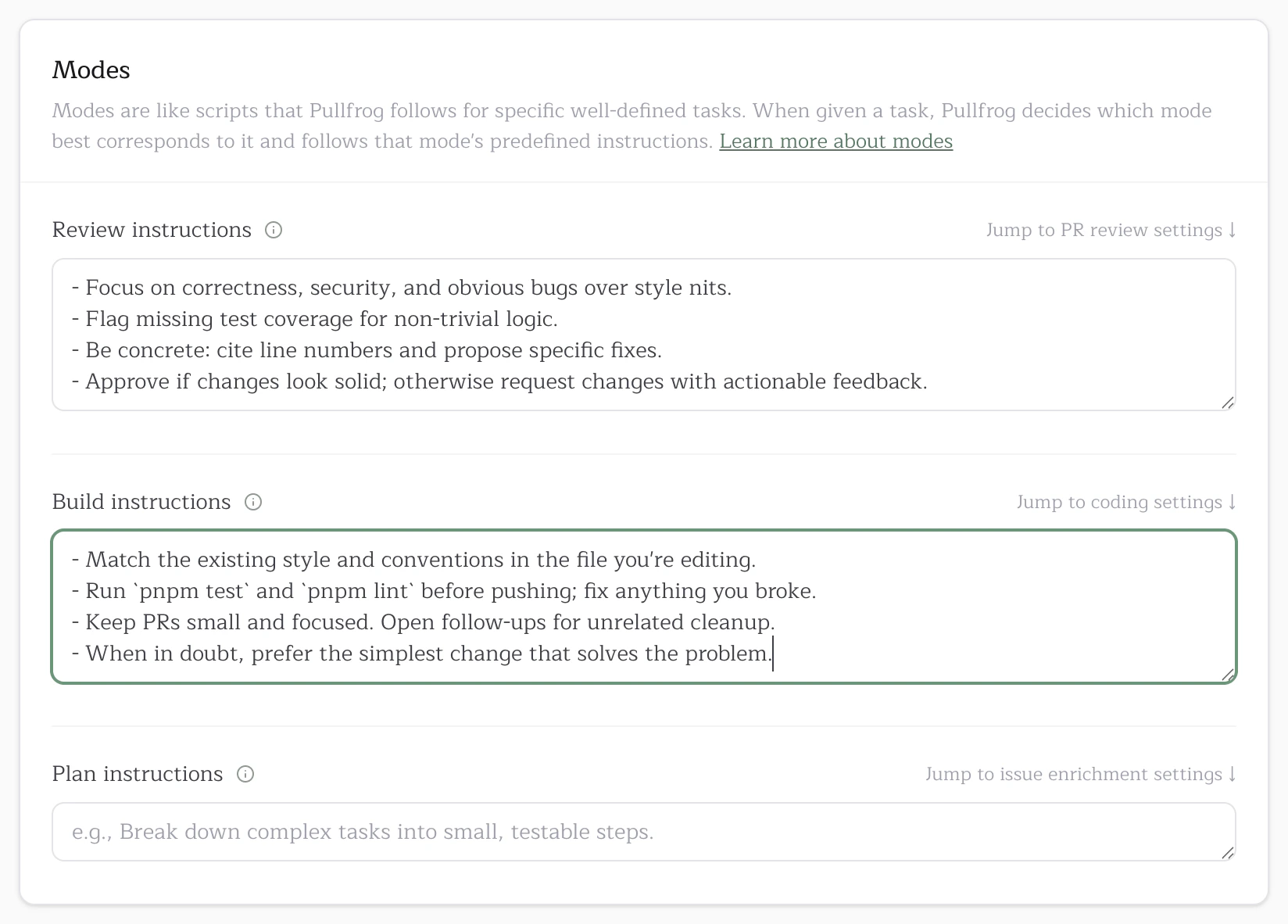 Use this for things like "always check for missing test coverage," "flag any new dependencies," or repo-specific style preferences. Keep it short and concrete — the agent already follows good defaults.