> ## Documentation Index
> Fetch the complete documentation index at: https://docs.pullfrog.com/llms.txt
> Use this file to discover all available pages before exploring further.
# BYOK
If you'd rather use your own provider keys instead of [Pullfrog Router](/billing#pullfrog-router), Pullfrog supports BYOK (bring your own key) for every [supported provider](/models#supported-providers). You control the provider, the spend, and the data.
Most users should start with [Pullfrog Router](/billing#pullfrog-router) — no keys to manage, billed at raw provider cost, and your `$10` signup credit (claim it from the **Router** tab) covers your first runs. BYOK is here for teams that already have provider relationships, custom rate limits, or compliance reasons to use direct keys.
If you specifically want to use an existing **ChatGPT Pro/Plus/Business/Enterprise subscription** instead of buying OpenAI API tokens, see [ChatGPT subscription](/codex-auth) — there's a dedicated one-command CLI for it (`npx pullfrog auth codex`) that's simpler than pasting keys.
## How to provide keys
Pullfrog can pick up provider keys from two places. Use the one that fits your team — you can mix and match per provider.
### Pullfrog secrets (recommended)
Store your provider keys directly in the Pullfrog console. Pullfrog encrypts them at rest, injects them into the agent runtime at dispatch, and never writes them to your repository or workflow files. No `pullfrog.yml` edits required.
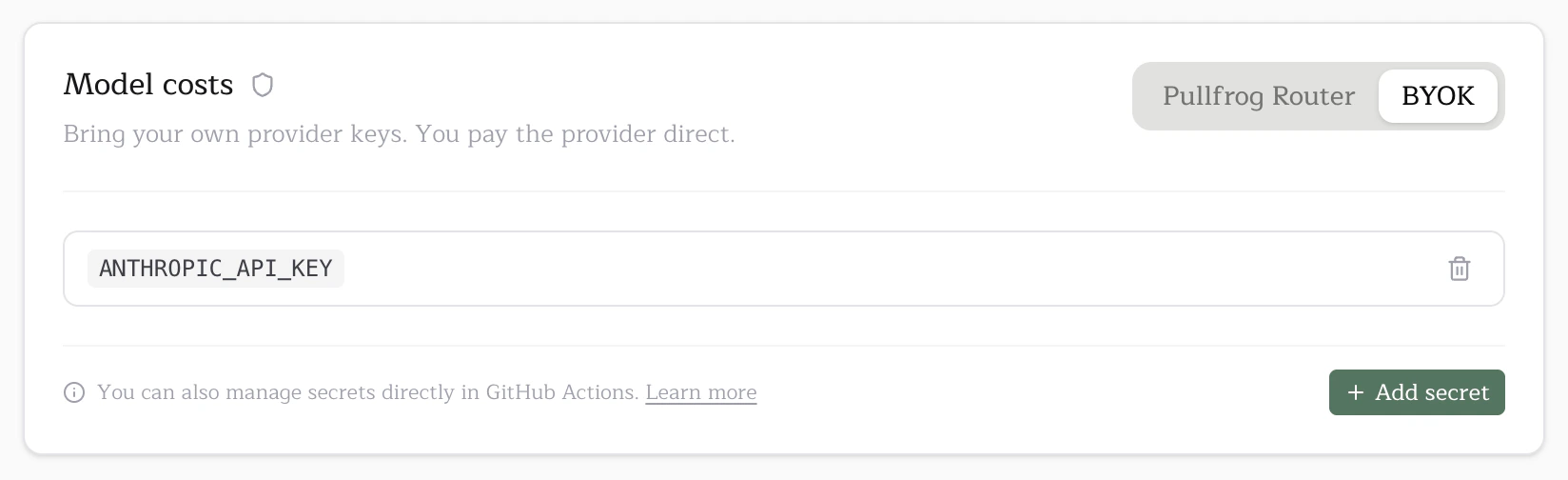
1. Open `pullfrog.com/console/` and find the **Model costs** card.
2. Switch to the **BYOK** tab.
3. Click **Add secret**, set the name to your provider's env var (e.g. `ANTHROPIC_API_KEY` — see [supported providers](/models#supported-providers)), paste the value, and save.
 The Add secret modal lets you scope the secret to your whole organization or a specific repo:
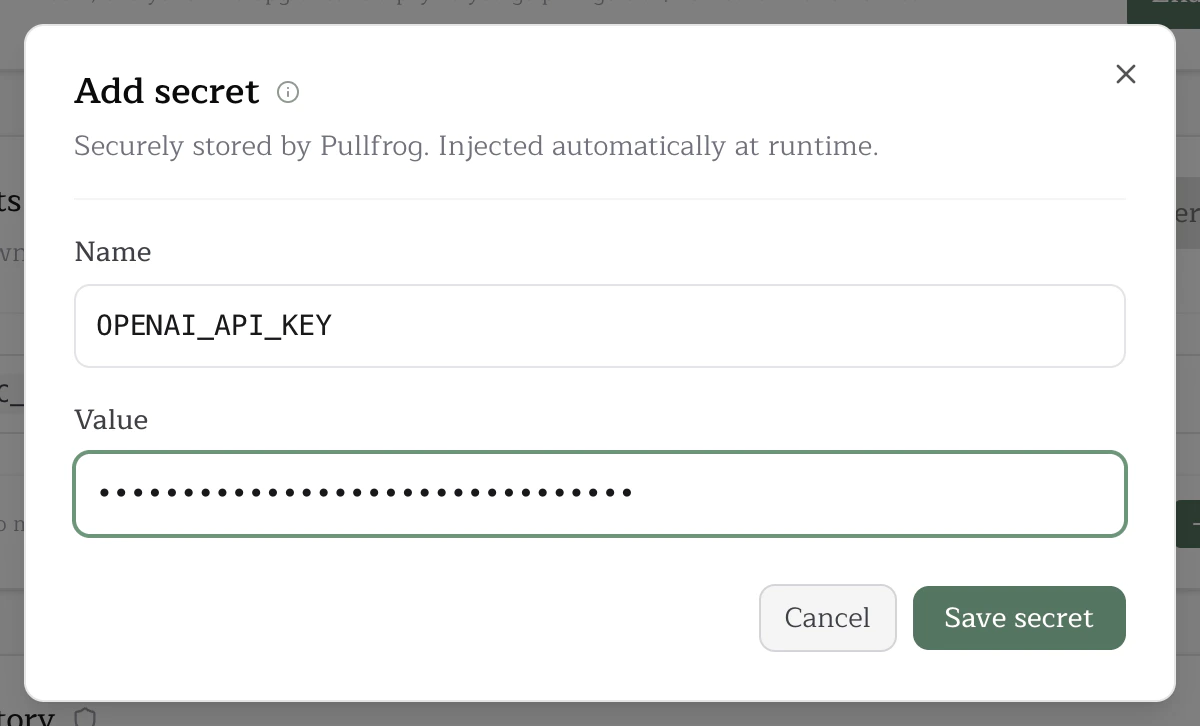 Org-level secrets are inherited by every repo in the organization; repo-level secrets override an org secret of the same name for that one repo.
You can also manage secrets per repo from the **Secrets** card on the repo console:
Org-level secrets are inherited by every repo in the organization; repo-level secrets override an org secret of the same name for that one repo.
You can also manage secrets per repo from the **Secrets** card on the repo console:
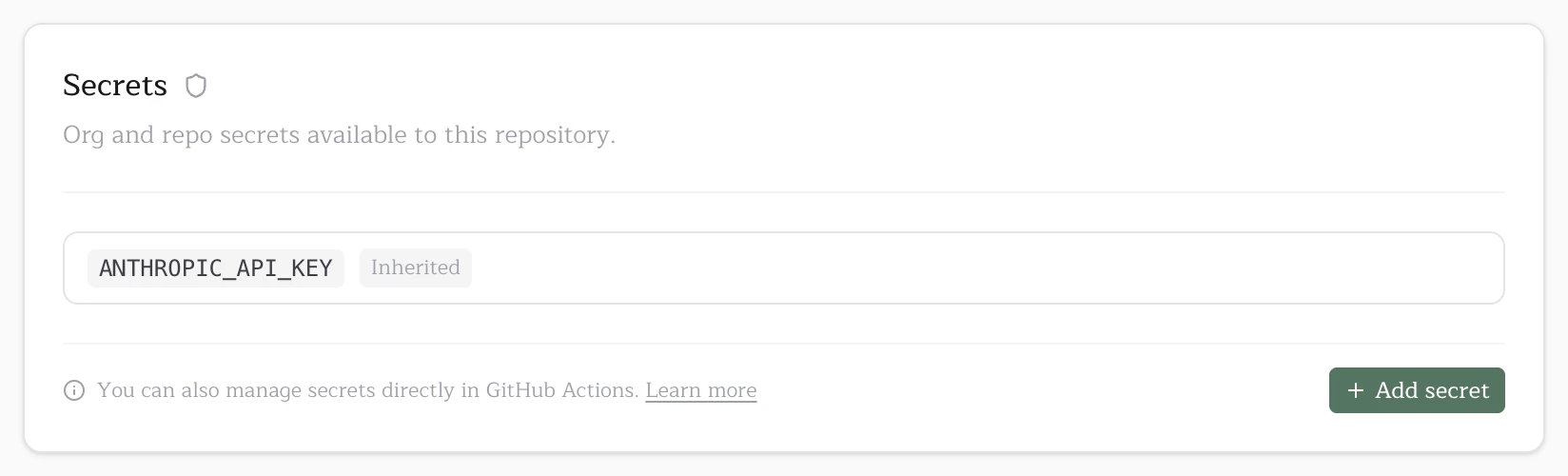 Inherited org secrets show up here read-only so it's clear which keys are available to the repo. Adding a repo secret with the same name overrides the org one for this repo only.
### GitHub Actions secrets (alternative)
If you'd rather keep keys in GitHub Actions secrets — for example, because you already have org-wide secret rotation tooling there — Pullfrog also reads keys from the workflow `env:` block.
1. Add the secret in GitHub. Org-level (`github.com/organizations//settings/secrets/actions` → **New organization secret**) or repo-level (`github.com///settings/secrets/actions` → **New repository secret**).
2. Map it into `pullfrog.yml`:
```diff theme={null}
jobs:
pullfrog:
runs-on: ubuntu-latest
steps:
- name: Run agent
uses: pullfrog/pullfrog@v0
with:
prompt: ${{ inputs.prompt }}
+ env:
+ ANTHROPIC_API_KEY: ${{ secrets.ANTHROPIC_API_KEY }}
```
If a key is set in both the workflow `env:` and Pullfrog secrets, **the workflow value wins**. This lets you override Pullfrog-stored secrets per-workflow when needed.
## Free models
A handful of models are completely free and work out of the box with zero key setup:
* **Big Pickle** (OpenCode)
Select it in the [model selector](/models#selecting-a-model) and skip BYOK entirely.
## Amazon Bedrock
If you want to route through your own AWS Bedrock account instead of going to a model vendor directly, see [Amazon Bedrock](/bedrock) for the multi-secret setup. Bedrock is BYOK only and uses pinned model IDs (no aliasing) so enterprise compliance and provisioned-throughput contracts stay predictable.
## Google Vertex AI
If you want to route through your own Google Cloud project, see [Google Vertex AI](/vertex) for the service-account setup. Vertex AI is BYOK only and uses pinned model IDs through `VERTEX_MODEL_ID`.
## Troubleshooting
**"Missing API key" error in GitHub Actions**
The agent couldn't find a valid key at runtime. Check, in order:
1. The selected model's required env var is set somewhere — Pullfrog secrets (Model costs → BYOK) or a workflow `env:` mapping.
2. The secret name matches the provider's env var exactly (e.g. `ANTHROPIC_API_KEY`, not `CLAUDE_API_KEY`).
3. If you used GitHub secrets, the secret is mapped in your `pullfrog.yml` `env:` block — Actions only injects what the workflow file lists.
**"Missing API key" warning in the Pullfrog console**
The console couldn't find the env var the selected model needs. Add the secret via the Model costs card or switch to a model whose key you already have.
Inherited org secrets show up here read-only so it's clear which keys are available to the repo. Adding a repo secret with the same name overrides the org one for this repo only.
### GitHub Actions secrets (alternative)
If you'd rather keep keys in GitHub Actions secrets — for example, because you already have org-wide secret rotation tooling there — Pullfrog also reads keys from the workflow `env:` block.
1. Add the secret in GitHub. Org-level (`github.com/organizations//settings/secrets/actions` → **New organization secret**) or repo-level (`github.com///settings/secrets/actions` → **New repository secret**).
2. Map it into `pullfrog.yml`:
```diff theme={null}
jobs:
pullfrog:
runs-on: ubuntu-latest
steps:
- name: Run agent
uses: pullfrog/pullfrog@v0
with:
prompt: ${{ inputs.prompt }}
+ env:
+ ANTHROPIC_API_KEY: ${{ secrets.ANTHROPIC_API_KEY }}
```
If a key is set in both the workflow `env:` and Pullfrog secrets, **the workflow value wins**. This lets you override Pullfrog-stored secrets per-workflow when needed.
## Free models
A handful of models are completely free and work out of the box with zero key setup:
* **Big Pickle** (OpenCode)
Select it in the [model selector](/models#selecting-a-model) and skip BYOK entirely.
## Amazon Bedrock
If you want to route through your own AWS Bedrock account instead of going to a model vendor directly, see [Amazon Bedrock](/bedrock) for the multi-secret setup. Bedrock is BYOK only and uses pinned model IDs (no aliasing) so enterprise compliance and provisioned-throughput contracts stay predictable.
## Google Vertex AI
If you want to route through your own Google Cloud project, see [Google Vertex AI](/vertex) for the service-account setup. Vertex AI is BYOK only and uses pinned model IDs through `VERTEX_MODEL_ID`.
## Troubleshooting
**"Missing API key" error in GitHub Actions**
The agent couldn't find a valid key at runtime. Check, in order:
1. The selected model's required env var is set somewhere — Pullfrog secrets (Model costs → BYOK) or a workflow `env:` mapping.
2. The secret name matches the provider's env var exactly (e.g. `ANTHROPIC_API_KEY`, not `CLAUDE_API_KEY`).
3. If you used GitHub secrets, the secret is mapped in your `pullfrog.yml` `env:` block — Actions only injects what the workflow file lists.
**"Missing API key" warning in the Pullfrog console**
The console couldn't find the env var the selected model needs. Add the secret via the Model costs card or switch to a model whose key you already have.