> ## Documentation Index
> Fetch the complete documentation index at: https://docs.pullfrog.com/llms.txt
> Use this file to discover all available pages before exploring further.
# Amazon Bedrock
Pullfrog can route LLM calls through your AWS account using [Amazon Bedrock](https://aws.amazon.com/bedrock/) instead of going to the model vendor directly. Useful when you have AWS credits, an enterprise AWS contract, compliance requirements that mandate AWS-hosted inference, or provisioned-throughput capacity you want to keep using.
Bedrock support is BYOK only. Inference is billed by AWS to your account; Pullfrog never proxies Bedrock traffic.
## Setup
Three things, in order: pick the model in the dropdown, add the bearer token as a secret, and put the region + model ID in your workflow.
### 1. Select Amazon Bedrock in the model dropdown
In `pullfrog.com/console//`, open the model dropdown and pick **Amazon Bedrock**. The console will then show you exactly which env vars are still missing.
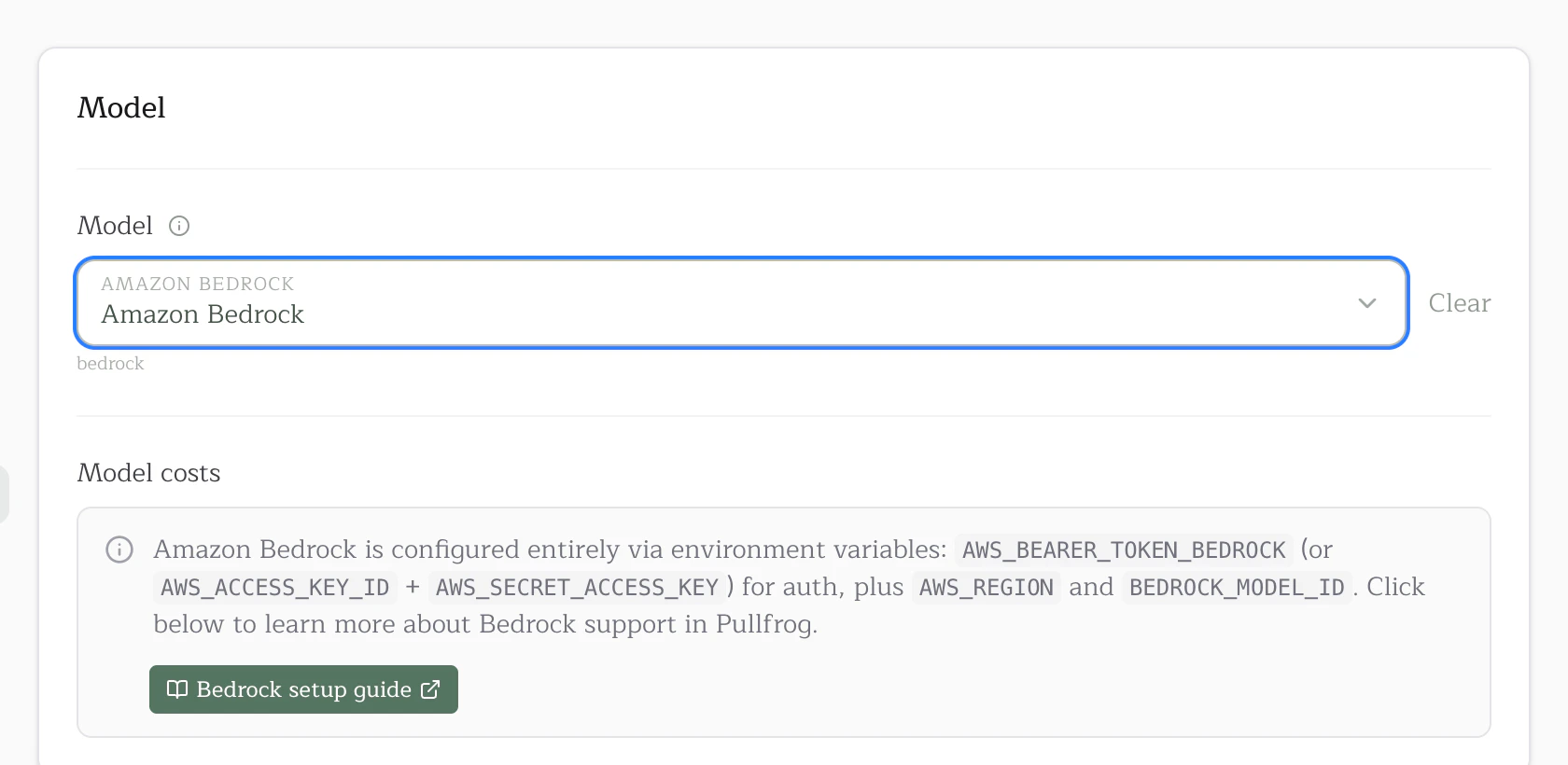 Unlike other providers in the catalog, the Bedrock entry doesn't have per-model variants in the dropdown. The actual model — Claude Opus 4.6, Nova Pro, Llama 4 Scout, etc. — is supplied separately via `BEDROCK_MODEL_ID` (see step 3). This is intentional: most Bedrock customers have specific model-access enrollments, provisioned throughput, or compliance reviews tied to exact model versions, and silent alias bumps would break all three. What you set is what runs.
### 2. Store your Bedrock credentials as a secret
Pullfrog needs your AWS credentials at run time to call Bedrock on your behalf. Either:
* a **Bedrock API key** (recommended for headless use) — mint one in the [Bedrock console](https://console.aws.amazon.com/bedrock/) under **API keys**. This becomes the `AWS_BEARER_TOKEN_BEDROCK` env var.
* an **IAM access key pair** with `bedrock:InvokeModel` permission. Becomes `AWS_ACCESS_KEY_ID` + `AWS_SECRET_ACCESS_KEY` (and optional `AWS_SESSION_TOKEN` if you're using STS).
You can store the credential as either a [Pullfrog secret or a GitHub Actions secret](/keys#how-to-provide-keys) — both work. The trade-off is the same as for any other provider key: Pullfrog secrets are auto-injected into every run with no workflow changes, while GitHub secrets keep keys inside your existing org-wide secret rotation tooling but require an `env:` mapping in `pullfrog.yml`. See the [Keys page](/keys#how-to-provide-keys) for the full comparison.
### 3. Hardcode `AWS_REGION` and `BEDROCK_MODEL_ID` in `pullfrog.yml`
These two values aren't sensitive. `AWS_REGION` is just `us-east-1` (or your region), and `BEDROCK_MODEL_ID` is a public Bedrock model identifier you'd see in the AWS console. Put them directly in your workflow's `env:` block — don't bother with secret storage for either:
```yaml theme={null}
- name: Run agent
uses: pullfrog/pullfrog@v0
with:
prompt: ${{ inputs.prompt }}
env:
# ... your other provider keys ...
AWS_BEARER_TOKEN_BEDROCK: ${{ secrets.AWS_BEARER_TOKEN_BEDROCK }}
AWS_REGION: us-east-1
BEDROCK_MODEL_ID:
```
(If you stored the bearer token as a Pullfrog secret instead of a GitHub Actions secret, drop the `AWS_BEARER_TOKEN_BEDROCK` line — Pullfrog auto-injects it.)
To switch model versions later, edit `BEDROCK_MODEL_ID` directly and commit. Pullfrog never resolves or upgrades the value — what you set is what runs.
### 4. (Anthropic only) Submit the use-case form
AWS auto-enables most Bedrock models on first invocation — Nova, Llama, Mistral, DeepSeek, Qwen, GPT-OSS will all just work. The one exception: **first-time users of Anthropic models** must submit a one-time use-case form in the [Bedrock console](https://console.aws.amazon.com/bedrock/) under **Model catalog → pick the Anthropic model → Request access**. Approval is instant. If your run errors with `AccessDeniedException` and your model ID contains `anthropic`, this is the cause.
## Picking a model ID
`BEDROCK_MODEL_ID` should be the exact AWS Bedrock model ID, the same string you'd see in the AWS console under **Model catalog → Programmatic Access**. Some common picks:
* `us.anthropic.claude-opus-4-6-v1` — Claude Opus 4.6 (US cross-region inference)
* `us.anthropic.claude-sonnet-4-6` — Claude Sonnet 4.6 (US)
* `us.anthropic.claude-haiku-4-5-20251001-v1:0` — Claude Haiku 4.5 (US)
* `amazon.nova-pro-v1:0` — Amazon Nova Pro
* `amazon.nova-lite-v1:0` — Amazon Nova Lite
* `us.meta.llama4-scout-17b-instruct-v1:0` — Llama 4 Scout (3.5M context)
* `us.meta.llama4-maverick-17b-instruct-v1:0` — Llama 4 Maverick (1M context)
* `deepseek.v3.2` — DeepSeek V3.2
* `us.deepseek.r1-v1:0` — DeepSeek R1 (reasoning)
* `moonshotai.kimi-k2.5` — Kimi K2.5
* `mistral.mistral-large-3-675b-instruct` — Mistral Large 3
* `qwen.qwen3-coder-480b-a35b-v1:0` — Qwen 3 Coder
* `openai.gpt-oss-120b-1:0` — OpenAI GPT-OSS 120B
The full list of Bedrock-hosted models is at [docs.aws.amazon.com/bedrock](https://docs.aws.amazon.com/bedrock/latest/userguide/model-cards.html). Anything in the **Programmatic Access** section of a model card works — including cross-region inference profile IDs (the `us.`, `eu.`, `jp.`, `au.`, and `global.` prefixes) and base in-region IDs. Pick a geo prefix that matches your `AWS_REGION` (e.g. `us.*` for `us-east-1`, `eu.*` for `eu-west-1`).
## How routing works
Pullfrog detects whether the model is Anthropic by checking the ID for the substring `anthropic`:
* **Anthropic IDs** (e.g. `us.anthropic.claude-opus-4-6-v1`) run through the [Claude Code](https://docs.claude.com/en/docs/claude-code/amazon-bedrock) CLI, which talks to Bedrock natively once `CLAUDE_CODE_USE_BEDROCK=1` is set. Pullfrog sets that env var automatically.
* **Everything else** (Nova, Llama, Mistral, DeepSeek, Qwen, GPT-OSS, etc.) runs through [OpenCode's `amazon-bedrock` provider](https://anomalyco-opencode.mintlify.app/providers). Pullfrog prepends the `amazon-bedrock/` prefix automatically.
## Troubleshooting
**"BEDROCK\_MODEL\_ID env var is required when the model is set to bedrock/byok"**
You picked Amazon Bedrock as the model but didn't set `BEDROCK_MODEL_ID` in your workflow's `env:` block. Add it (see step 3 above).
**"Bedrock model selected but required configuration is missing"**
One or more of the three required values isn't set. The error message lists exactly what's missing.
**Run starts but the LLM call returns 403/AccessDeniedException**
For Anthropic models: see [step 4](#4-anthropic-only-submit-the-use-case-form) — first-time use of an Anthropic model on Bedrock requires a one-time use-case form.
For other models: your IAM policy is missing `bedrock:InvokeModel` for that model's resource ARN. (If you're using a Bedrock API key instead of IAM access keys, this almost never happens — the bearer token already grants invoke permission to anything in the account.)
**Run starts but the LLM call returns ValidationException about the model ID**
The `BEDROCK_MODEL_ID` value isn't a valid Bedrock ID for your region. Check the model card's **Programmatic Access** section in the AWS console — the ID format depends on whether you're using cross-region inference (geo prefix) or in-region invocation (no prefix). Make sure the geo prefix matches your `AWS_REGION`.
Unlike other providers in the catalog, the Bedrock entry doesn't have per-model variants in the dropdown. The actual model — Claude Opus 4.6, Nova Pro, Llama 4 Scout, etc. — is supplied separately via `BEDROCK_MODEL_ID` (see step 3). This is intentional: most Bedrock customers have specific model-access enrollments, provisioned throughput, or compliance reviews tied to exact model versions, and silent alias bumps would break all three. What you set is what runs.
### 2. Store your Bedrock credentials as a secret
Pullfrog needs your AWS credentials at run time to call Bedrock on your behalf. Either:
* a **Bedrock API key** (recommended for headless use) — mint one in the [Bedrock console](https://console.aws.amazon.com/bedrock/) under **API keys**. This becomes the `AWS_BEARER_TOKEN_BEDROCK` env var.
* an **IAM access key pair** with `bedrock:InvokeModel` permission. Becomes `AWS_ACCESS_KEY_ID` + `AWS_SECRET_ACCESS_KEY` (and optional `AWS_SESSION_TOKEN` if you're using STS).
You can store the credential as either a [Pullfrog secret or a GitHub Actions secret](/keys#how-to-provide-keys) — both work. The trade-off is the same as for any other provider key: Pullfrog secrets are auto-injected into every run with no workflow changes, while GitHub secrets keep keys inside your existing org-wide secret rotation tooling but require an `env:` mapping in `pullfrog.yml`. See the [Keys page](/keys#how-to-provide-keys) for the full comparison.
### 3. Hardcode `AWS_REGION` and `BEDROCK_MODEL_ID` in `pullfrog.yml`
These two values aren't sensitive. `AWS_REGION` is just `us-east-1` (or your region), and `BEDROCK_MODEL_ID` is a public Bedrock model identifier you'd see in the AWS console. Put them directly in your workflow's `env:` block — don't bother with secret storage for either:
```yaml theme={null}
- name: Run agent
uses: pullfrog/pullfrog@v0
with:
prompt: ${{ inputs.prompt }}
env:
# ... your other provider keys ...
AWS_BEARER_TOKEN_BEDROCK: ${{ secrets.AWS_BEARER_TOKEN_BEDROCK }}
AWS_REGION: us-east-1
BEDROCK_MODEL_ID:
```
(If you stored the bearer token as a Pullfrog secret instead of a GitHub Actions secret, drop the `AWS_BEARER_TOKEN_BEDROCK` line — Pullfrog auto-injects it.)
To switch model versions later, edit `BEDROCK_MODEL_ID` directly and commit. Pullfrog never resolves or upgrades the value — what you set is what runs.
### 4. (Anthropic only) Submit the use-case form
AWS auto-enables most Bedrock models on first invocation — Nova, Llama, Mistral, DeepSeek, Qwen, GPT-OSS will all just work. The one exception: **first-time users of Anthropic models** must submit a one-time use-case form in the [Bedrock console](https://console.aws.amazon.com/bedrock/) under **Model catalog → pick the Anthropic model → Request access**. Approval is instant. If your run errors with `AccessDeniedException` and your model ID contains `anthropic`, this is the cause.
## Picking a model ID
`BEDROCK_MODEL_ID` should be the exact AWS Bedrock model ID, the same string you'd see in the AWS console under **Model catalog → Programmatic Access**. Some common picks:
* `us.anthropic.claude-opus-4-6-v1` — Claude Opus 4.6 (US cross-region inference)
* `us.anthropic.claude-sonnet-4-6` — Claude Sonnet 4.6 (US)
* `us.anthropic.claude-haiku-4-5-20251001-v1:0` — Claude Haiku 4.5 (US)
* `amazon.nova-pro-v1:0` — Amazon Nova Pro
* `amazon.nova-lite-v1:0` — Amazon Nova Lite
* `us.meta.llama4-scout-17b-instruct-v1:0` — Llama 4 Scout (3.5M context)
* `us.meta.llama4-maverick-17b-instruct-v1:0` — Llama 4 Maverick (1M context)
* `deepseek.v3.2` — DeepSeek V3.2
* `us.deepseek.r1-v1:0` — DeepSeek R1 (reasoning)
* `moonshotai.kimi-k2.5` — Kimi K2.5
* `mistral.mistral-large-3-675b-instruct` — Mistral Large 3
* `qwen.qwen3-coder-480b-a35b-v1:0` — Qwen 3 Coder
* `openai.gpt-oss-120b-1:0` — OpenAI GPT-OSS 120B
The full list of Bedrock-hosted models is at [docs.aws.amazon.com/bedrock](https://docs.aws.amazon.com/bedrock/latest/userguide/model-cards.html). Anything in the **Programmatic Access** section of a model card works — including cross-region inference profile IDs (the `us.`, `eu.`, `jp.`, `au.`, and `global.` prefixes) and base in-region IDs. Pick a geo prefix that matches your `AWS_REGION` (e.g. `us.*` for `us-east-1`, `eu.*` for `eu-west-1`).
## How routing works
Pullfrog detects whether the model is Anthropic by checking the ID for the substring `anthropic`:
* **Anthropic IDs** (e.g. `us.anthropic.claude-opus-4-6-v1`) run through the [Claude Code](https://docs.claude.com/en/docs/claude-code/amazon-bedrock) CLI, which talks to Bedrock natively once `CLAUDE_CODE_USE_BEDROCK=1` is set. Pullfrog sets that env var automatically.
* **Everything else** (Nova, Llama, Mistral, DeepSeek, Qwen, GPT-OSS, etc.) runs through [OpenCode's `amazon-bedrock` provider](https://anomalyco-opencode.mintlify.app/providers). Pullfrog prepends the `amazon-bedrock/` prefix automatically.
## Troubleshooting
**"BEDROCK\_MODEL\_ID env var is required when the model is set to bedrock/byok"**
You picked Amazon Bedrock as the model but didn't set `BEDROCK_MODEL_ID` in your workflow's `env:` block. Add it (see step 3 above).
**"Bedrock model selected but required configuration is missing"**
One or more of the three required values isn't set. The error message lists exactly what's missing.
**Run starts but the LLM call returns 403/AccessDeniedException**
For Anthropic models: see [step 4](#4-anthropic-only-submit-the-use-case-form) — first-time use of an Anthropic model on Bedrock requires a one-time use-case form.
For other models: your IAM policy is missing `bedrock:InvokeModel` for that model's resource ARN. (If you're using a Bedrock API key instead of IAM access keys, this almost never happens — the bearer token already grants invoke permission to anything in the account.)
**Run starts but the LLM call returns ValidationException about the model ID**
The `BEDROCK_MODEL_ID` value isn't a valid Bedrock ID for your region. Check the model card's **Programmatic Access** section in the AWS console — the ID format depends on whether you're using cross-region inference (geo prefix) or in-region invocation (no prefix). Make sure the geo prefix matches your `AWS_REGION`.